
AI agents in enterprises are surrounded by hype and uncertainty.
Teams see its potential: faster decisions, reduced manual effort, and systems that can assist work in real time. At the same time, unclear use cases, missing roadmaps, and risk concerns keep most AI initiatives confined to pilots and experimentation.
As reported in a McKinsey & Co.’s State of AI 2025 article, fewer than 10% of organizations successfully scale AI agents.

What's missing here? Not ambition. Not intelligence. It's clarity in execution.
This guide is designed to bring that clarity by explaining what AI agents actually are, how they work, how they help inside enterprise workflows, and what it takes to deploy them in a way that earns trust and long-term value.
-
01
AI agents are not just smarter chatbots. Chatbots answer questions. Copilots assist users. Assistants execute tasks with approval. AI agents go further—they observe workflows, reason about what needs to happen next, and act toward outcomes within defined guardrails.
-
02
Most AI agent projects fail because of execution challenges. Unclear use cases, fragmented data, weak governance, and poor workflow integration stall many initiatives. Enterprises often underestimate the operational complexity of deploying autonomous systems inside real business processes.
-
03
Standalone agents rarely scale in enterprise environments. Agents built for demos or experimentation often live outside core systems and require users to interact with them separately. Production-grade agents are embedded directly into existing workflows and activate when real work happens.
-
04
Trust in AI agents grows through governance and gradual autonomy. Enterprises must define where agents can act independently, where human approval is required, and how actions are logged and audited. Autonomy expands gradually as reliability and trust grow.
-
05
Scaling AI starts with solving one workflow problem at a time. Successful enterprises begin with a single high-impact workflow. Once that system proves reliable, its architecture, governance model, and integrations become reusable across the organization.
We’ll cover this guide in two parts (feel free to jump to any section):
Part A: Understanding AI Agents (The Fundamentals)
This section focuses on building a shared understanding of AI agents. Here, we cover:
- How AI agents differ from chatbots, copilots, and AI assistants
- What an AI agent actually is
- How AI agents work
- The AI agent ecosystem: builders, frameworks, and marketplaces
- How AI agents are applied across business functions
- How AI agents are applied across industries
Part B: Deploying AI Agents in Enterprises (From Pilots to Scale)
This section shifts from understanding to execution. Here, we look at:
- The difference between standalone agents vs enterprise-grade agents
- Why most enterprise AI agent initiatives fail
- What successful enterprises do differently to deploy agents at scale
- A Practical AI Agent Readiness Checklist
- How Gyde helps enterprises operationalize AI agents inside real workflows
If you’re already experimenting with AI agents, Part B is where most practical insights begin.
With that context, let’s start by separating conversational AI from systems designed to act with a degree of autonomy.
Part A: Understanding AI Agents (The Fundamentals)
Chatbot vs Copilot vs AI Assistant vs AI Agent
Most teams use Salesforce to track deals, update opportunities, and keep CRM data clean. Now imagine adding AI to the mix
The same underlying AI can appear in different forms (chatbot, copilot, assistant, or agent) depending on how much responsibility it takes and how independently it acts.
Let’s break it down clearly:
- Chatbot
A chatbot responds only when you ask it something. Take for example, a sales rep asks, “Where do I update customer details?” The chatbot replies: “Go to the Contact record and update the Email and Phone fields.”
It explains. It does not act. It waits for instructions.
- Copilot
A copilot works alongside you in real time. Let's imagine while a rep updates an opportunity, the copilot suggests better notes, flags missing fields, or recommends next steps.
It assists, but the human is still in control. It suggests. It doesn’t execute independently.
- AI Assistant
An AI assistant can perform tasks but only after you approve. It reads call notes and prepares updates to opportunity fields. Then it asks: “Do you want me to apply these changes?”
It does the work. You approve before it acts.
- AI Agent
An AI agent works toward an outcome with more autonomy. It updates opportunity stages based on activity, creates follow-up tasks, fixes incomplete CRM data, and sends reminders automatically. It operates within defined guardrails and business rules.
It doesn’t just assist. It maintains outcomes.
In short:
Chatbots answer.
Copilots assist.
Assistants execute.
AI agents operate.
| System | How it’s triggered | What it does | What it doesn’t do |
|---|---|---|---|
| Chatbot | User asks a question | Responds with answers or explanations | Take action or execute tasks |
| Copilot | User initiates a task | Assists step-by-step while the user stays in control | Own or run the workflow independently |
| AI Assistant | User explicitly requests help | Retrieves information and summarizes across sources | Drive outcomes or make decisions autonomously |
| AI Agent | System event or state change | Plans and acts autonomously toward a defined goal | Operate without guardrails, constraints, or oversight |
In a recent GydeBites episode, Ashmeet Singh (Head of AI Engineering at TCS) explains difference between chatbots, automation and AI agents using everyday enterprise examples (like order escalations, onboarding breakdowns, service delays). If you're evaluating when to move from automation to agentic systems, this discussion provides useful context.
What is an AI Agent?
◾AI agents: a clear definition
An Artificial Intelligence (AI) agent is a software system that plans and takes actions to achieve a goal, with minimal human input.
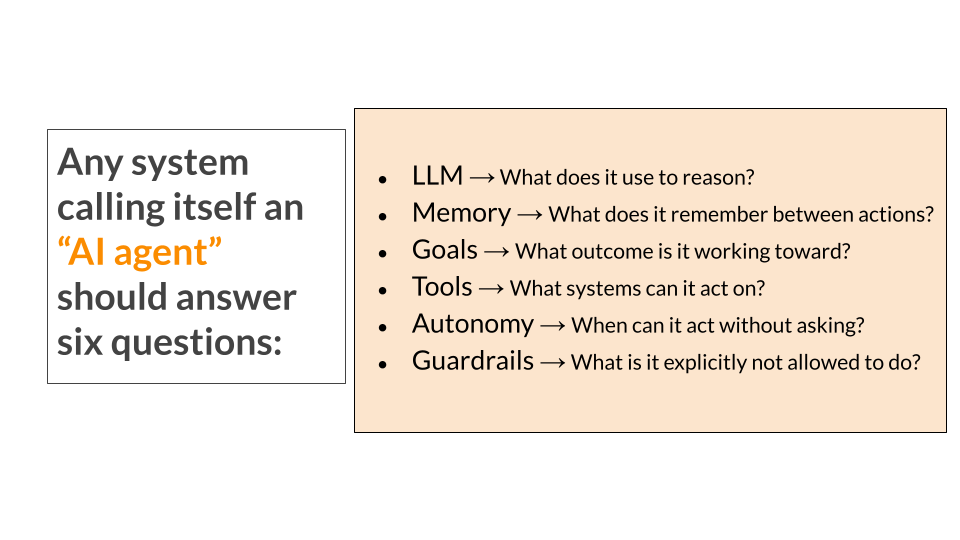
AI Agent = LLM + Memory + Goal + Tools + Autonomy + Guardrails
Remove any one of these, and you don’t really have an AI agent:
- No memory → it forgets
- No tools → it can’t act
- No goals → it doesn’t progress
- No guardrails → it’s unsafe
Curious how these pieces come together in enterprise workflows? Scroll down to “How AI Agents Work.”
◾What is the difference between AI agents and Agentic AI?
Let's take a quick detour to understand how AI agents and Agentic AI are related but not the same.
- AI agents are purpose-built systems designed to assist or act at specific points within a workflow, operating under clear rules, permissions, and human oversight. It executes tasks.
- Agentic AI, on the other hand, is an AI system that can pursue a goal independently by planning, making decisions, taking multiple actions, and adapting until the objective is achieved. It drives outcomes.
For example, if you want to book a meeting, you can tell an AI agent to “Book a meeting at 3 PM. It books the meet. If 3 PM is busy, it asks you what to do next. But if Agentic AI is in place and you mention “I need to meet CXO this week.” The agent finds a time, books it, sends invite, adds agenda — all by itself.
Agentic AI is the bigger idea of giving AI more freedom to act. AI agents are the smaller, focused tools you can use along the way.
GOLDEN TIP: Enterprises wanting success can start small (mostly experimenting with different types of AI agents) and increase autonomy only after governance, trust, and workflow fit are in place. That's how Agentic AI can be applied.
◾Types of AI Agents (Based on How They’re Used)
Not all AI agents work the same way. Here are the most common types you’ll see in day-to-day workflows:
- Task-based agent: It handles a single, well-defined task. Tasks like scheduling meetings, validating data, or approving requests. They are most common ones in enterprises today.
- Workflow agents: It operates across multiple steps and systems. Consider this workflow: Lead → qualification → CRM update → follow-up email. They can actually bring real ROI to organizations.
- Event-driven agents: It gets triggered by events, not prompts. Think of a scenario like a sales deal moves to “Negotiation” → agent alerts finance + updates forecast.
- Decision-support agents: It analyzes data and suggest actions. For example, say risk assessment, compliance checks, underwriting support. They often assist rather than fully act.
- Autonomous agents (high risk, high control needed): Such agents operate with minimal oversight. Auto-remediation in infra, fraud blocking are some rare examples we see in enterprises without heavy guardrails.
Now let's move on to answer: Regardless of type, how does an agent actually work?
How AI Agents Work
At their core, AI agents run on a simple loop:
Observe → Reason → Act → Learn → Repeat
This loop is what allows an agent to move beyond one-off responses (like chatbots or copilots) and work toward outcomes over time.
Let's walk through what really happens under the hood when an AI agent runs in a real-world scenario.
Take a classic enterprise sales use case: A sales rep has identified a qualified lead and now needs to book a discovery call to explore the opportunity further.
Here's how a modern AI agent can step in and handle (or dramatically accelerate) the process:
Step 1: The Agent Observes Its Environment
Every agent starts by understanding the current state its in. This information can come from user inputs, system events, APIs, databases, or application logs or changes inside a workflow. At this stage, the agent isn’t deciding or acting yet. It’s simply answering one question: “What’s happening right now?”
This observed state becomes the foundation for everything that follows.
In case of example taken, the agent detects a new qualified opportunity, required stakeholders (AE, SE, maybe Legal), calendar availability, time zones, and SLA rules. It understands the current state before doing anything.
Step 2: The Agent Reasons About What to Do Next
Once the agent understands the current state, it evaluates its options.
Here, the agent considers:
- Its goal (what outcome it’s working toward)
- Its memory (what has already happened)
- Its constraints and rules (what it’s allowed to do)
This is the decision-making phase. The agent determines whether action is required or what the next best action is or whether it should wait, escalate, or ask for human input. This is also where task planning can happen, breaking a larger objective into smaller, executable steps.
In case of example taken, it evaluates its goal (schedule within SLA), constraints (availability, working hours), and policies (who must attend based on deal size). Then it determines the best next action.
Step 3: The Agent Takes Action
After deciding what to do, the agent acts.
Actions might include:
- Updating records in business systems
- Triggering workflows
- Calling external services
- Sending notifications
- Or requesting approvals when required by policy
This is where tools and permissions come into play.
In case of example taken, the agent proposes optimal time slots, blocks internal calendars, sends invites, and updates the CRM. If needed, it triggers reminders or escalations.
Step 4: The Agent Observes the Outcome
Every action produces a result.
The agent checks:
- Did the action succeed?
- Did it fail?
- Did it trigger a new event or constraint?
Without this feedback, AI agent would blindly repeat the same steps.
In case of example taken, the agents recalculates in scenarios like if someone declines or if the prospect didn't respond. The agent re-evaluates and adjusts automatically.
Step 5: The Agent Updates Its State and Continues
Based on the outcome, the agent updates its memory and internal state.
It may:
- Store new information
- Adjust future decisions
- Retry with a different approach
- Or conclude the task if the goal is achieved
In case of example taken, it keeps recalculating, nudging, and coordinating until the meeting is confirmed or escalation is required.
This is what allows AI agents to operate iteratively.
The loop continues until:
- The goal is met
- A guardrail is reached
- Or human intervention is required
◾What Role Do Large Language Models(LLMs) Have in AI Agents?
At this point, you might be wondering: is the LLM itself the AI agent?
Within AI agents, LLMs serve as the reasoning and decision-making engine, interpreting inputs and determining next actions. Technically speaking, an LLM is a neural network trained on massive text datasets to learn statistical patterns in language. It works by:
- Converting text into numerical representations (tokens and embeddings)
- Using attention mechanisms to model relationships between words across long contexts
- Predicting the most likely next token given the context
However, an LLM on its own is not an AI agent.
It does not know:
- what it is responsible for,
- which outcomes to prioritize, or
- when to act.
Those boundaries are defined externally, through the agent’s role, goals, and instructions. Without this framing, the model remains a general-purpose engine rather than a purpose-built system.
◾How Do AI Agents Interact With Systems?
A common concern with AI agents is obvious: If agents can act inside systems, how do they not break compliance, access control, and trust?
The answer is simple: agents don’t bypass enterprise systems; they operate through them.
AI agents interact using tools, APIs(Application Programming Interfaces), and sanctioned integrations, the same controlled interfaces used by humans and automation. It allows the agent to retrieve information, update records, trigger actions, or surface insights within existing applications.
Instead of relying on generic training data, AI agents pull information from:
- Approved knowledge bases
- Policies and process documentation
- Role-specific and historical data
AI Agents inherit existing:
- Role-based access controls
- Data permissions
- Approval workflows
If a human user can’t do something, the agent can’t either.
What's best for enterprises is accountability as every agent action is logged, attributable and auditable.

AI Agents Builders, Frameworks and Marketplaces: Understanding the Ecosystem
Once teams understand what an AI agent is and how it behaves, the next question is practical: how are these agents actually being built today?
Over the last year, a growing set of AI agent builders, AI agent frameworks, and AI agent marketplaces have emerged to make AI agent development faster and more accessible.
While this variety is a sign of momentum, it also adds to the confusion, especially for enterprise teams trying to move beyond experimentation. At a high level, most offerings in the AI agents ecosystem fall into three broad categories:
i. No-Code and Low-Code AI Agent Builders
Tools such as Langflow, Voiceflow, Relevance AI, and Zapier AI Agents sit at the top of the stack, abstracting away most of the underlying agent logic.
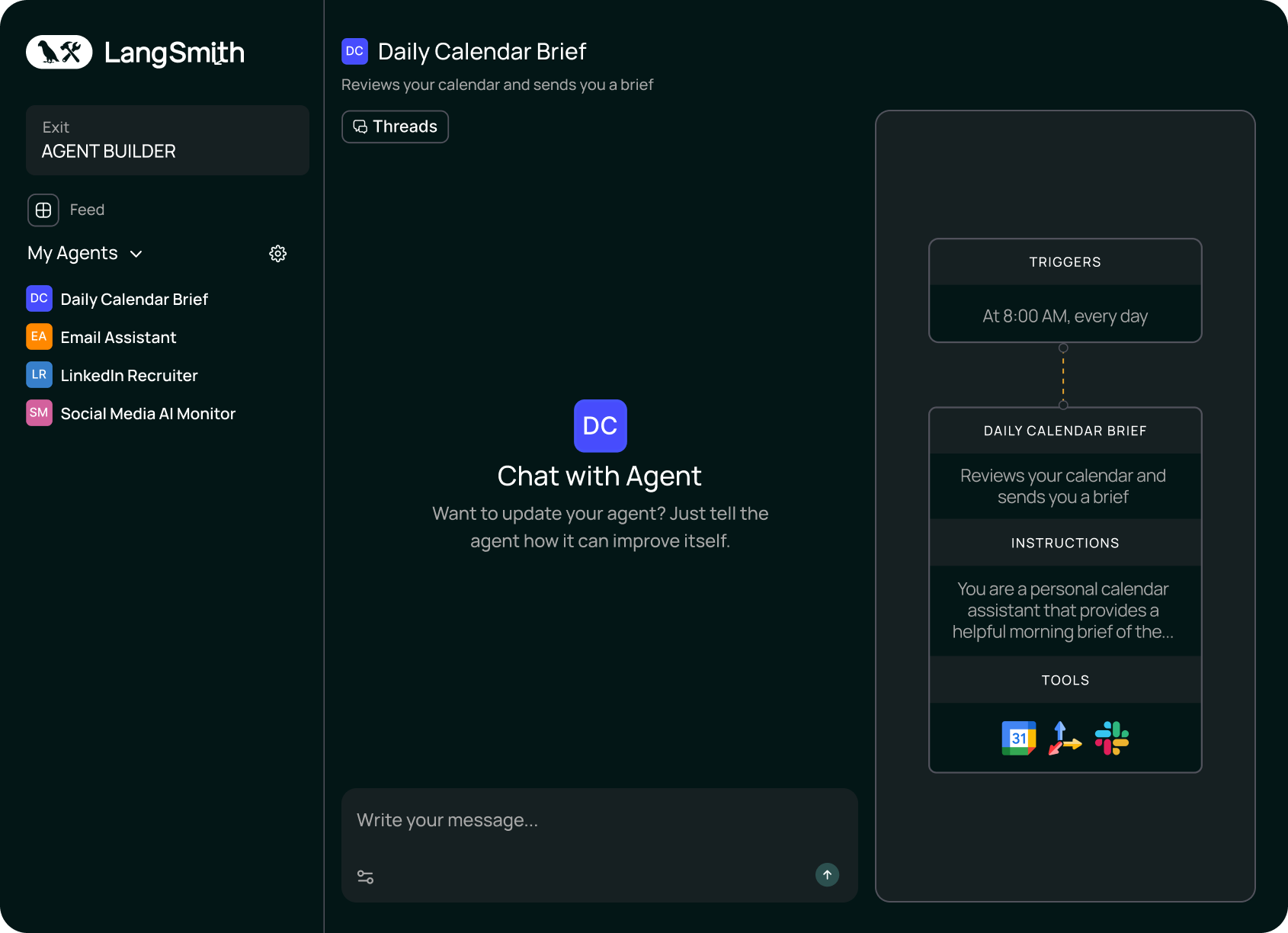
These builders allow teams to define an agent’s role, goals, instructions, memory, and knowledge sources through visual interfaces or configuration panels rather than code. For early-stage exploration, this dramatically lowers the barrier to entry and accelerates prototyping.
Where these tools fall short is longevity. They are optimized for:
- Prompt experimentation
- Narrow, self-contained workflows
- Short-lived use cases
They are not optimized for the complexity of enterprise-grade orchestration, governance, and lifecycle management. As a result, agents built here often stall once they are asked to operate inside interconnected workflows.
ii. AI Agent Marketplaces and Directories
A growing number of AI agent marketplaces and AI agents directories aim to simplify discovery by offering prebuilt agents for common use cases. These can be useful for inspiration or quick trials, but they are rarely production-ready for enterprise environments.
Most marketplace agents are designed to be broadly applicable, which means they lack the context, controls, and integration needed for organization-specific workflows. In regulated or high-stakes environments, this gap becomes especially visible.
iii. Developer-First AI Agent Frameworks
Frameworks such as LangChain, LangGraph, AutoGen, Semantic Kernel, CrewAI, RASA, and Hugging Face Transformers Agents give engineering teams direct control over reasoning, retrieval, tool calling, and multi-agent coordination.
These frameworks give engineering teams direct control over how agents reason, retrieve data, call tools, and coordinate with other agents. This flexibility enables sophisticated behavior but shifts the burden of reliability, security, and scale onto the team building the system.
In enterprise settings, this typically means:
- Longer development timelines
- Higher maintenance overhead
- Additional infrastructure for monitoring, cost control, and compliance
This is where many initiatives slow down. The agent works. The demo impresses. But operationalizing the system (keeping it stable, observable, and auditable) becomes a CHALLENGE.
iv. AI Transformation Partners
Beyond builders, marketplaces, and frameworks, a fourth category is emerging: AI transformation partners. These are not platforms you license and configure on your own. They are partners who:
- Help identify the right AI use cases inside your business
- Design and build use-case-specific AI agents
- Integrate them directly into your live workflows
- Ensure compliance, governance, and auditability
- Own performance, iteration, and long-term stability
In other words, they don’t just help you build an AI agent. They help you operationalize intelligence in the flow of work.
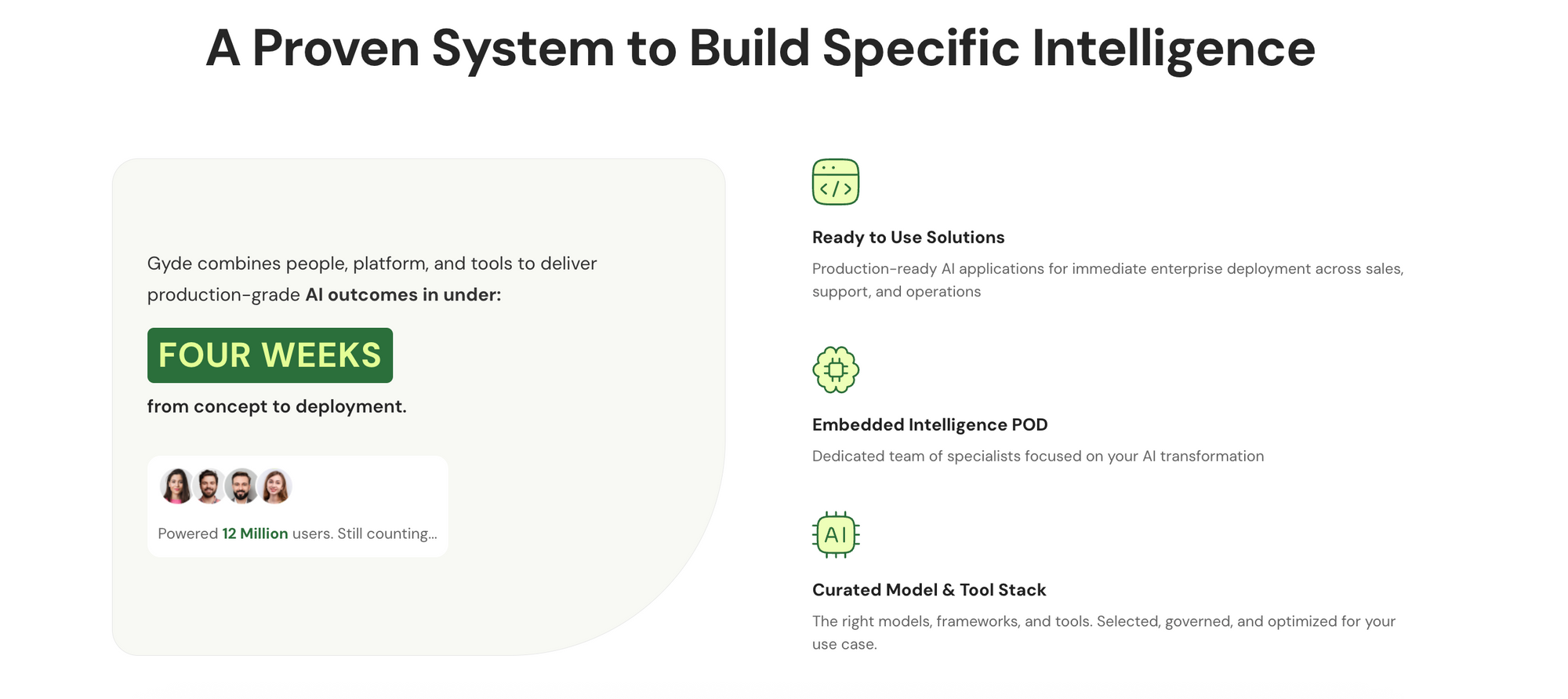
Companies like Gyde reside this category. They work with organizations to identify one high-impact problem and build a Specific Intelligence System (SIS) around it.
For example, it could be brand-safe communication in regulated industries, workflow compliance inside operations, or data quality enforcement inside core systems.
But the difference is this: Gyde doesn’t just help you deploy it and walk away. It owns the intelligence system end-to-end from design and deployment to monitoring, refining, and long-term performance. As workflows evolve and edge cases emerge, the system evolves with them.
The idea is simple: don’t start with “let’s deploy AI.” Start with “what’s breaking inside our workflow?” Then embed intelligence exactly there and continuously improve it.
AI Agents Across Business Functions
Across business functions, AI agents improve speed, consistency, and execution quality without adding more manual effort.
Let’s look at how different teams use them.
A. AI Agents for Customer Service
- 24/7 Query Resolution: AI agents handle repetitive, high-volume customer queries across chat, email, and voice. They instantly resolve FAQs, order status checks, refunds, and policy questions.
- Context-Aware Support: They access customer history and detect intent or sentiment in real time, enabling more accurate and relevant responses.
- Smart Escalation: Agents classify tickets by urgency and route complex or sensitive cases to the right human agent, along with conversation summaries.
B. AI Agents for Marketing
- Intelligent Audience Segmentation: AI agents analyze behavioral, demographic, and engagement data to create precise audience segments. This allows marketing teams to run more targeted campaigns and reduce wasted spend.
- Automated Content & Campaign Optimization: They assist in generating campaign assets (from ads to emails) and refine them using performance signals. By continuously testing and adjusting, teams improve ROI without manual analysis cycles.
- Predictive Insights & Lead Prioritization: AI agents assess engagement patterns to predict buying intent and rank leads accordingly. Marketing can allocate budget and attention toward prospects most likely to convert.
C. AI Agents for Sales
- Smart Lead Qualification: AI agents evaluate inbound leads using behavioral and intent data, automatically identifying high-potential opportunities. Sales teams spend less time filtering and more time closing.
- Automated Follow-Ups & Outreach: They draft contextual outreach, schedule follow-ups, and track responses. This ensures consistent engagement and reduces delays in the sales cycle.
- Deal Intelligence & Forecasting: AI agents analyze pipeline trends, deal progression, and risk signals in real time.Sales leaders gain clearer visibility into revenue projections and potential gaps.
AI Agents Across Industries
While above patterns repeat across teams, industry context ultimately determines how much autonomy an agent can be trusted with. Regulatory pressure, data sensitivity, and operational risk shape how agents are designed and deployed.
A. AI Agents in Finance
- In finance functions, AI agents support risk analysis, policy interpretation, and compliance-related workflows.
- They assist by retrieving relevant documentation, highlighting potential risk indicators, and helping teams align decisions with internal controls and regulatory guidelines. Human review remains central, especially where financial or compliance risk is involved.
- Take example of JPMorgan Chase’s COiN (Contract Intelligence) platform. It uses AI to review commercial agreements. It reportedly cut error rates by 80% and freed up 360,000 hours of legal review time annually.
B. AI Agents in Healthcare
- In healthcare environments, AI agents are used to support documentation, record navigation, and protocol reference.
- They help clinicians and administrative staff move through complex systems more efficiently and reduce documentation effort. Clinical decisions and patient care remain the responsibility of healthcare professionals.
- St. John’s Health uses AI agents that, with patient consent, ambiently capture exam conversations and turn them into concise post-visit summaries for care continuity and billing.
C. AI Agents in Manufacturing
- In manufacturing and operations-driven industries, AI agents are applied to process adherence, system navigation, and exception handling.
- They guide users through standard operating procedures, surface the correct instructions at the right step, and help teams follow consistent workflows across shifts and locations. This reduces reliance on informal knowledge and lowers the risk of process deviation.
- At one manufacturer, repeated login failures on plant-floor systems were generating constant support tickets. An AI agent spotted the pattern, traced it to an Active Directory integration, and routed it to the right IT team.
Part B: Deploying AI Agents in Enterprises (From Pilots to Scale)
Standalone Agents vs Enterprise-Grade Agents
- Standalone agents are built to operate independently. They usually live outside core business systems, rely on prompts rather than workflow events, and are optimized for experimentation, demos, and individual productivity.
In controlled environments, they work well. But they assume ideal conditions: clean inputs, constant human oversight, and low consequences when something goes wrong.
- Enterprise agents operate under very different conditions. They are embedded inside existing applications, triggered by real workflow events, and constrained by role-based access, approvals, and compliance rules.
Their job isn’t to showcase intelligence, but to support work reliably at the moment decisions are made. They must know when to act, when to pause, and when to escalate to a human, all while leaving a clear audit trail.
This is why pilots often succeed and scaling fails. Standalone agents avoid responsibility; enterprise agents are designed around it.
Once teams understand this distinction, the question shifts from ‘How do we build an AI agent?’ It becomes ‘How do we design and deploy AI that fits naturally into how work already happens?’”
Why Most AI Agent Initiatives Fail in Enterprises
Most enterprise AI agent initiatives fail not due to technological limitations, but because organizations underestimate the complexity of integrating autonomous systems into established workflows, governance frameworks, and operational patterns.
Here are some common challenges:
Challenge 1: Pilot Without a Purpose
Many AI agent initiatives kick off with a focus on the technology itself rather than anchoring them to tangible business needs. This "tool-first" mindset leads to projects that prioritize flashy demos or proof-of-concepts over solving real pain points, resulting in scattered efforts that lack direction.
A key issue here is the absence of well-defined key performance indicators (KPIs) from the outset. Without these, it's challenging to measure success, secure ongoing executive buy-in, or justify resource allocation.
Hype creates unrealistic expectations, but when agents fail to move revenue, efficiency, or risk metrics, projects stall.
Successful enterprises invert this approach: they begin with a specific operational bottleneck and design the agent explicitly to improve a defined business outcome.
Challenge 2: Broken Data Foundations & Weak Infrastructure
AI agents depend on clean, connected, real-time data but most enterprises operate on siloed, legacy systems. When data is fragmented, outdated, or poorly integrated, agents lack context and produce unreliable outputs.
Unstable APIs, mismatched formats, and incomplete datasets lead to flawed recommendations, eroding trust and stalling adoption.
“Garbage in, garbage out” becomes operational reality.
Successful enterprises treat data readiness and integration as foundational while unifying systems, strengthening APIs, and fixing data hygiene before scaling AI agents.
Challenge 3: AI Agents Aren't in the Flow of Work
The primary failure pattern follows a predictable sequence where teams:
- Start by deploying an agent platform,
- Build agent capabilities
- Announce availability
- Expect adoption
Adoption rarely materializes.
As suggested in the section above, the root cause here is because most AI agents operate as standalone systems. They require users to shift between multiple interfaces and contexts. For support teams already multitasking, this extra cognitive load kills usage.
Successful implementations work differently. AI agents are embedded directly into existing workflows. They surface insights inside tools teams already use and execute actions within established systems
Rule of thumb: If an AI agent requires behavior change before delivering value, adoption will stall.
Challenge 4: Governance That Either Chokes Agents or Lets Them Run Wild
Enterprises swing between two bad options:
*Too little control over AI agents
- execute actions outside approved parameters
- make commitments violating company policy
- access inappropriate data
When stakeholders request explanations, teams often lack documentation of decision-making processes or action triggers.
*Too much control over AI agents
- Agents that only “suggest”
- Endless human reviews
- High cost, low ROI
In this mode, agents become expensive automation scripts; technically impressive, operationally irrelevant.
What works is neither extreme.
Effective teams define clear boundaries:
- Where agents can act autonomously
- Where human approval is required
- How every action is logged, explained, and audited
Governance shouldn’t eliminate autonomy. It should make autonomy safe to deploy.
Challenge 5: Humans Don’t Change Behavior Just Because Tools Are Smarter
Even well-built AI agents fail when human risk is ignored.
Users are asked to learn new interfaces, change habits, defend AI decisions upstream, and absorb edge-case failures. That’s just added exposure, disguised as convenience.
So employees default to manual processes. They may be slower, but they’re predictable and safe. When something breaks, accountability is clear.
This is why many AI agent programs look active but create little impact. Metrics like recommendations generated don’t translate to actions taken because trust never forms.
What’s missing is progression. Successful teams treat autonomy as a trust curve:
- Start narrow
- Prove reliability inside real workflows
- Expand authority deliberately
Autonomy isn’t a switch you flip. It’s a capability you earn.
How Enterprises Successfully Deploy AI Agents at Scale
Most enterprises don’t fail at building AI agents. They fail at operationalizing them.
It’s relatively easy to get an agent working in isolation. Many teams already have pilots that look impressive in demos. What’s hard is making those agents reliable, trusted, and consistently used inside real workflows.
The difference comes down to how agents are treated.
Teams that scale AI agents don’t treat them as standalone tools. They treat them as part of the business system. Let’s walk through what building AI agent looks like, using a Email Agent as an example:
1. Start With The Workflow Before The Agent
Teams that succeed don’t begin by asking what kind of agent to build.
They start by looking at where work breaks down today.
- High cognitive load.
- Repeated checks.
- Manual handoffs.
- Decision friction.
Once those moments are clear, you'll find the role of the agent. The agent isn’t introduced as “AI”. It shows up as help at a specific step in a specific workflow like form completion, document review, or policy interpretation.
That’s why these agents get used.
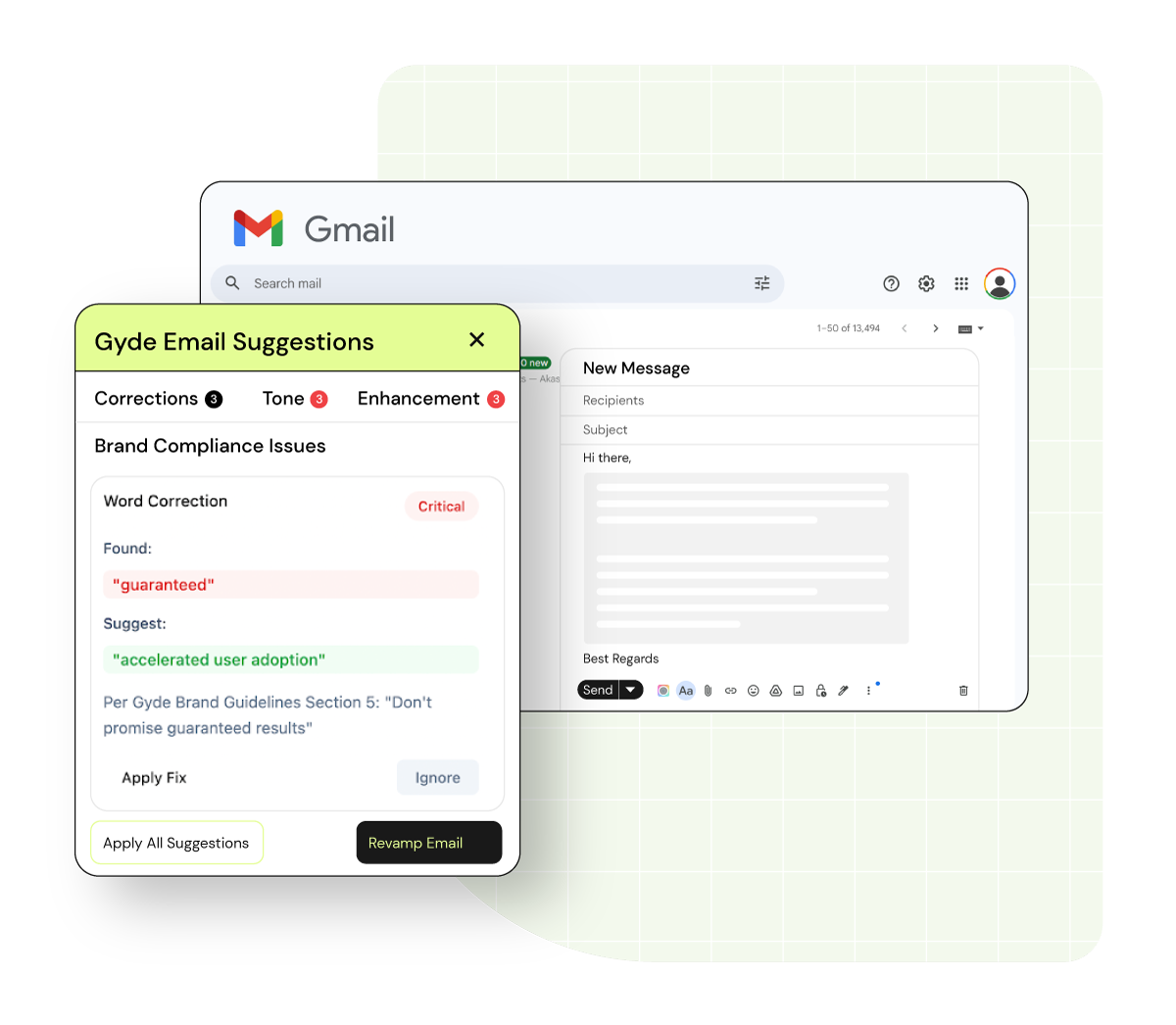
Consider this in regulated industries: Outbound email is a high-risk workflow. Sales teams move fast. Compliance reviews lag. Brand inconsistencies slip through. That’s where a brand-safe email agent fits.
It appears inside the email composer. It flags risky language. It inserts mandatory disclosures. It escalates when needed.
2. Prepare & Structure Internal Knowledge
At small scale, agents can rely on ad-hoc context (knowledge generated on-the-fly to address a specific & immediate problem).
At enterprise scale, that stops working.
Before deploying an agent, decide which knowledge it is allowed to use. Identify the specific documents, policies, datasets, and process definitions relevant to the workflow the agent supports. Not everything should be accessible.
Next, clean and organize that knowledge. Resolve outdated versions, remove contradictions, and establish a clear source of core knowledge. The goal isn’t to ingest everything; it’s to make sure the agent references the right information consistently.
For the email workflow we considered earlier, this means the agent doesn’t browse the entire knowledge base. It is restricted to validated compliance documents and approved brand standards. Outdated policy versions are removed. Conflicting guidance is resolved. The goal of AI agents is to get controlled, reliable knowledge.
When a rep types “guaranteed returns,” the agent doesn’t improvise. It references defined regulatory language, suggests compliant alternatives, and logs the intervention. Reliability is what enables scale.
3. Place AI Agents Where Work Actually Happens
Another pattern shows up consistently: placement drives agent usage & trust.
Agents that live outside core applications like behind separate logins or browser tabs rarely stick. People forget them. Or worse, they ignore them.
So what does good placement actually mean?
It means deciding where in the workflow the agent should appear. Not as a general assistant, but as contextual help at a specific step while a form is being filled, a record is reviewed, or a decision is being made.
This is also where many teams struggle to execute. Embedding agents into enterprise software is what Gyde focuses on. In this case, the agent does not sit in a compliance dashboard. It does not require a new login. It does not interrupt workflow with separate review steps.
It appears inside:
- The CRM email composer
- Gmail or any messaging system
- The moment “Send” is triggered
It evaluates the draft in real time. It intervenes only when necessary.
4. Governance is designed early
As AI agents move closer to business-critical workflows, teams should define governance boundaries upfront, before agents are trusted with actual work.
So what does that actually mean?
First, decide where an agent is allowed to act on its own and where human approval is mandatory. Not every step needs the same level of autonomy. Updating records, flagging issues, or preparing drafts may be fully automated. Decisions with financial, legal, or compliance impact usually aren’t.
Next, enforce access and permissions through existing enterprise controls. Agents should inherit the same role-based access rules as users. If a human can’t see or change something, the agent shouldn’t either.
Finally, make every agent action traceable. Log what the agent did, why it acted, what data it used, and what outcome followed. This isn’t about micromanaging AI, it’s about making behavior explainable when questions arise.
Well-designed governance doesn’t slow agents down. It’s what makes autonomy safe enough to deploy in the first place.
In the email workflow:
- Tone corrections may be automatic.
- Disclosure insertion may be automatic.
- High-risk financial claims may require escalation.
Every action is logged:
- What was flagged
- What rule triggered it
- What change was suggested or applied
- Whether human approval was required
The agent inherits the same role-based permissions as the user. If a junior rep cannot send certain claims, neither can the agent.
5. Apply Proven Change-Management Principles
None of this works without people.
Enterprises that scale AI agents apply the same change-management principles (such as ADKAR) they’ve used for other major transformational shifts.
- Awareness comes from explaining why the agent exists.
- Desire builds when agents remove friction employees already feel.
- Knowledge comes from clarity around what the agent does and what it doesn’t.
- Ability develops as agents operate in live workflows and improve based on real usage.
- Reinforcement happens when autonomy expands gradually, only after reliability is proven.
Take the email workflow.
Employees are already writing emails. They are not being asked to open a new system, log into a new dashboard, or change how they work.
With a Gyde-embedded agent, intelligence appears inside the email composer itself. It scans drafts in real time. It flags risk. It inserts disclosures. It logs actions.
From the user’s perspective, nothing new is being “adopted.” The email workflow simply becomes safer and faster.
6. Standardize & Scale Across the Enterprise
This is the step most teams miss. Once an agent produces repeatable, measurable outcomes, it stops being a pilot. It becomes a blueprint.
When outcomes are predictable (reduced compliance risk, fewer review cycles, faster turnaround time) the underlying architecture becomes reusable.
Once the email agent proves:
- X% reduction in compliance violations
- Y% decrease in manual review workload
- Z% faster outbound communication cycles
You now have:
- A structured knowledge model
- Governance framework
- Integration pattern
- Audit logging structure
- Adoption strategy
That foundation can now be replicated.
The same architecture can support:
- Contract review agents in Legal
- Policy validation agents in HR
- Claims communication agents in Insurance
- Global rollouts across regions with localized regulatory datasets
This is how enterprises move from one impressive AI agent to a scalable agent ecosystem.
The AI Agent Readiness Checklist
The patterns above are easy to agree with in theory. The harder part is identifying where they break down inside your own workflows.
To help teams do that, we created an AI Agent Readiness Checklist. It is designed to assess, in a structured way, whether the conditions required to deploy and scale AI agents are truly in place.
The checklist helps teams identify where risk is concentrated before those risks surface in production, including:
- Use-case clarity and scope
- Knowledge and context control
- Workflow placement
- Governance and guardrails
- Human ownership and accountability
- Change management and adoption
- Scale readiness
If you’re evaluating whether your AI agents are ready to move beyond pilots, you can run this checklist in under 15 minutes.

How Gyde Helps Enterprises Operationalize AI Agents
Gyde is an AI Transformation partner that builds Specific Intelligence Systems (purpose-built AI systems) each designed to perform one clearly defined job inside your enterprise workflows.
Simply, One focused AI system for one critical business problem.
What is a Specific Intelligence System (SIS)?
- Specific: A system personalized to your proprietary data and workflows.
- Intelligent: Powered by a reasoning engine capable of task decomposition, error recovery, and continuous learning from execution data.
- System: A full-stack assembly including data connectors, schedulers (cron jobs), guardrails, parsers, information retrieval engines, and anything that is necessary to make the system work.
What does “One Clear Job” look like? It could mean:
- Ensuring employees follow compliance and brand guidelines while drafting emails (Brand-Safe Email Agent)
- Supporting underwriters with AI-powered risk assessment and document intelligence (Loan Underwriter Copilot)
- Helping sales representatives improve sales performance with AI-driven role-play training (AI Role-Play Sales Coach)
Take a closer look and you'll see all these use cases aren’t generic. They're defined by your organization’s constraints, data, and workflows. Gyde embeds a dedicated POD team (AI expert team) into your enterprise to own the AI solution for your specific use case end-to-end.
The process begins with workflow mapping and data architecture, then progresses to building and operationalizing a production-grade intelligent system [typically within four weeks].
This approach avoids a common enterprise AI trap: building broad, experimental agents that fail under real-world complexity. Instead of cycling through tools, prompts, and pilots, you move directly toward operational impact.
And here's why this scales: Once one workflow is operationalized,
- The architecture becomes reusable.
- The delivery framework is flexible.
- The governance model is repeatable.
Each subsequent system becomes faster to deploy and easier to scale.
If you’re evaluating how to move AI agents from pilots to operational use, the fastest way to build clarity is to see this Gyde approach applied to your own workflows.
Frequently Asked Questions (FAQs)
Q. Can AI agents operate across Microsoft applications like Teams, Outlook, and Dynamics?
A. Yes, AI agents can operate across Microsoft applications when they are designed to respect context and role boundaries. In enterprise environments, AI agents often surface insights within tools like Microsoft Teams or Outlook while executing actions inside systems such as Dynamics or SharePoint.
Q. What does an AI agents workflow actually mean in an enterprise context?
A. An AI agents workflow refers to how an AI agent is embedded into an existing business process, not how the agent reasons internally. In enterprise environments, this means the agent activates at specific steps in a workflow (such as data entry, review, validation, or decision support). The workflow defines when the agent appears, what context it has access to, and what actions it is allowed to support.
Q. How do AI agents work inside Salesforce?
A. AI agents inside Salesforce work best when they are embedded directly into CRM workflows rather than operating as standalone assistants. Instead of requiring users to prompt an agent, enterprise-grade AI agents activate at specific stages of sales, service, or operations workflows. They can surface relevant account context, flag data quality issues, guide required actions, and support decision-making while users remain inside Salesforce.
Q. How do enterprises choose between building AI agents internally versus using an AI agents builder?
A. The decision usually depends on complexity and risk. Internal builds offer flexibility and control but require significant engineering effort. AI agents builders reduce time-to-value but may limit customization or governance unless designed for enterprise use.
Many organizations adopt a hybrid approach: using builders for initial use cases while evolving toward more structured, workflow-embedded deployments as scale and regulatory requirements increase.
Q. Can AI agents workflows span multiple systems or applications?
A. Yes, but successful implementations still anchor the agent to a primary workflow. While an AI agent may retrieve information from multiple systems, it should present insights and actions within the application where the user is actively working. Cross-system intelligence should feel invisible to the user and not as an extra step.